S91 Login – Access Your Account
What Is S91 Login?
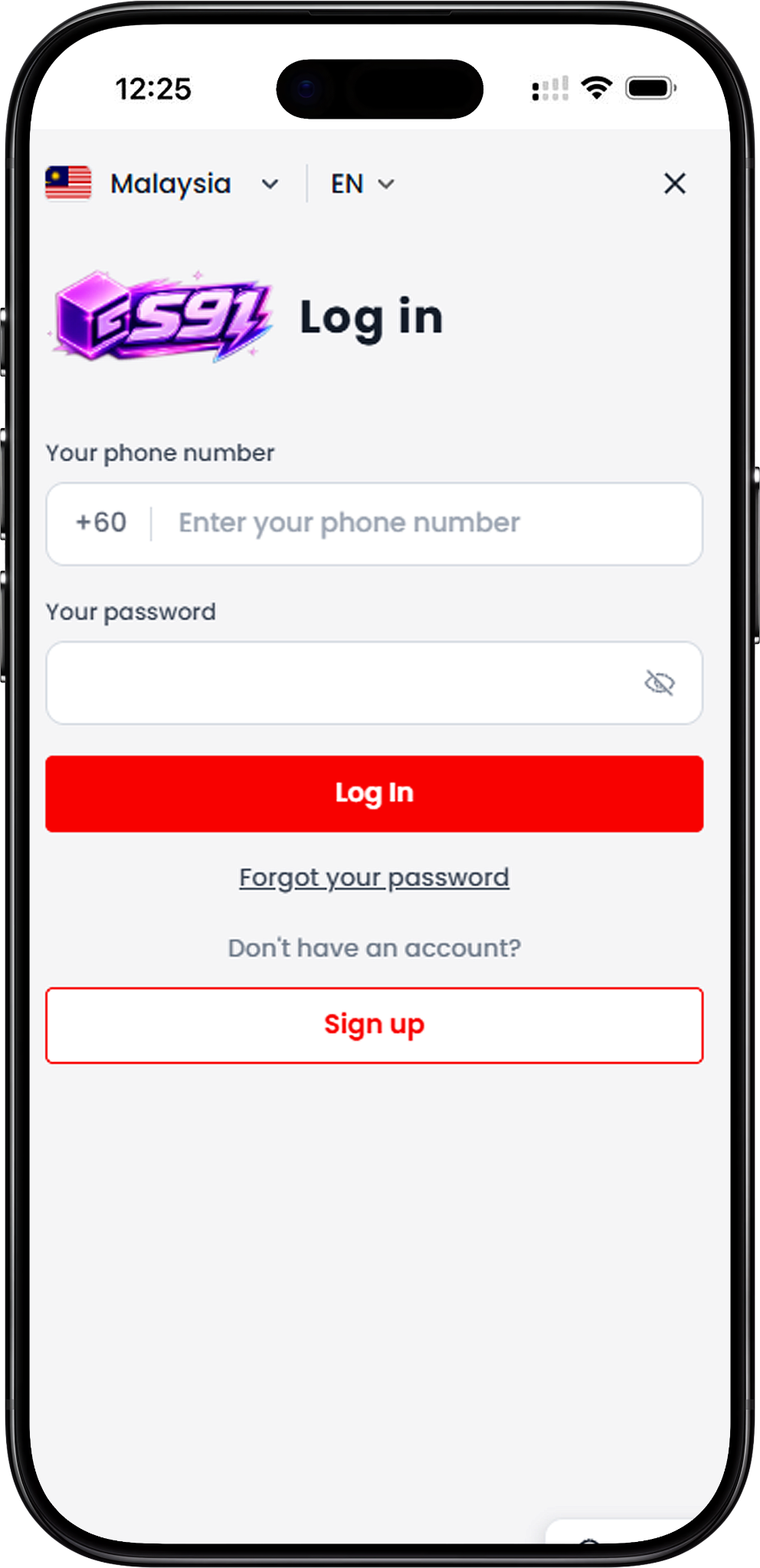
S91 Login is the account access page for existing users. The login screen provides fields for your phone number and password, together with options for password recovery and new account registration. Language options shown on the platform include English, Bahasa Malaysia and Chinese.
S91 Login Steps
Follow the steps below to Sign in with your registered account details. Check your phone number and password before submitting the login form.
Step 1: Open the S91 Login Page
Go to the S91 Login entry through the available H5 or Web access route. The login screen displays fields for your phone number and password.
Step 2: Select Your Phone Country Code
Check the country code displayed beside the phone number field. The login interface provides country code selection, including +60 and +65. Select the code associated with your registered phone number.
Step 3: Enter Your Phone Number
Enter the phone number linked to your S91 account in the phone number field. Make sure the number corresponds with the selected country code.
Step 4: Enter Your Password
Type your account password into the password field. A visibility control is available beside the field so you can manage how the password is displayed while entering it.
Step 5: Select Log In
Review your phone number and password, then select “Log In” to submit your account details and continue to S91BOX.
Access S91 Through H5 or Web
S91 can be accessed through its H5 or Web entry without changing the basic Sign in process. Existing users enter the phone number associated with their account and their password on the login screen to continue.
H5 Access
Use the available S91 H5 entry to reach the login interface from a compatible browser. Enter your registered account information and select “Log In” to proceed.
Web Access
The S91 Web login follows the same account access flow. Open the login page, check the selected country code, enter your phone number and password, and submit the form.
Forgot Your S91 Password?
If you cannot remember your password, select “Forgot your password” from the S91 Login screen. The password recovery page asks for the phone number linked to your account before an OTP can be requested.
Step 1: Open Forgot Password
Select “Forgot your password” below the Log In button to open the password recovery page.
Step 2: Select the Country Code
Choose the country code associated with your registered phone number. The recovery interface shown provides +60 and +65 options.
Step 3: Enter Your Linked Phone Number
Enter the phone number linked to your S91 account. Check that both the country code and phone number are correct before continuing.
Step 4: Request OTP
Select “Request OTP” after entering your linked phone number. Continue with the instructions presented by the platform to complete the password recovery process.
New to S91BOX?
Users who do not yet have an account can select “Sign up” directly from the login screen. This takes new users to the registration process instead of the S91 Login flow for existing accounts.
Go to Sign Up
Select the “Sign up” button shown under “Don’t have an account?” and follow the registration instructions to create an account.
S91 Login FAQ
How do I log in to S91?
Open the S91 Login page, select the appropriate phone country code, enter your registered phone number and password, then select “Log In.”
What information do I need to Sign in?
The login screen requires the phone number linked to your account and your password. You should also check that the correct country code is selected.
Can I access S91 Login through H5 or Web?
Yes. The available H5 or Web entry can be used to reach the S91 login interface, where existing users can enter their account details.
What should I do if I forget my S91 password?
Select “Forgot your password,” enter the phone number linked to your account with the appropriate country code, and select “Request OTP.” Then follow the instructions displayed by the platform.
Which phone country codes are shown on the S91 password recovery page?
The provided password recovery interface shows +60 and +65 as selectable phone country codes.
Can I create an account from the S91 Login page?
Yes. The login page includes a “Sign up” button for users who do not yet have an account.
Which languages are available on the S91 login interface?
The provided S91 interface shows English (EN), Bahasa Malaysia (BM) and Chinese as language options.
Access Your S91 Account
Enter your registered phone number and password to Sign in and continue to S91BOX through the available H5 or Web access.